
How a Session Unfolds
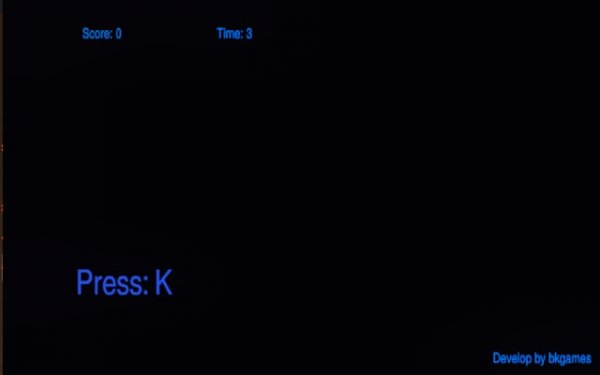
Keyboard Reflex: Quick Type Trainer runs on a simple loop. A random key prompt appears on screen, and you press the corresponding key on your physical keyboard. A correct press adds points. A wrong key or a slow response reduces the time left on the countdown clock. The session starts only after you press two specific keys at the same time, which triggers a 60-second timer. When the timer reaches zero, the game shows your final score.
Why Accuracy Matters as Much as Speed
Scoring rewards both correct presses and quick reactions, but the time penalty for errors keeps accuracy relevant. Players who rush and hit wrong keys lose seconds that are hard to recover. This design pushes you to find a sustainable rhythm rather than mash keys. Over repeated sessions, the goal is to react to visual cues without conscious thought, which is the foundation of muscle memory for key positions.
Interface and Feedback
The interface is minimal and functional. Large, clearly visible key prompts sit against a high-contrast background so they are easy to read at a glance. Subtle sound effects confirm correct and incorrect presses without becoming distracting. [IMG_1] There are no complex menus or progression systems to manage during play; the focus stays on the typing challenge itself.
Score Tracking and Self-Competition
Each correct key press adds a set number of points, and the final score acts as a personal benchmark. Because the game does not rely on external rewards or elaborate progression, motivation comes from beating your own previous score. This self-competitive structure makes it easy to run a quick session and measure improvement over time.
Who This Is For
The game suits students working on typing skills, professionals who want more keyboard efficiency, and anyone curious about reaction speed. It needs only a standard keyboard and a web browser. The mechanics are easy to pick up, but faster prompts keep the challenge meaningful for experienced typists.



Editorial Notes