Menu
Speed Lane: Endless Road Runner
Racing Driving Arcade Skill

Speed Lane: Endless Road Runner

Speed Lane: Endless Road Runner delivers exactly what it promises: a straightforward traffic-dodging experience that gets harder the longer you survive. The controls are crisp, the visuals are clear, and the difficulty curve feels fair. What stands out is how the game respects your time. No menus, no tutorials, no waiting. You crash, you restart, you try again. It is a focused, polished take on an old arcade concept that works well for both casual players and those chasing high scores.

🎮
Developer Eclipse Core Works
Rating
🎮 Game Player

About This Game

Highway Navigation Basics

Speed Lane: Endless Road Runner places players on a wide, multi-lane road filled with moving vehicles. The core task involves steering left or right to find open spaces and pass through gaps in traffic. Each session begins at a moderate pace, allowing newcomers to get comfortable with the controls. As the distance increases, the surrounding cars move faster and appear more frequently, demanding sharper attention and quicker decisions. The endless format means no two attempts feel exactly the same, as traffic patterns shift unpredictably.

Visual Design and Atmosphere

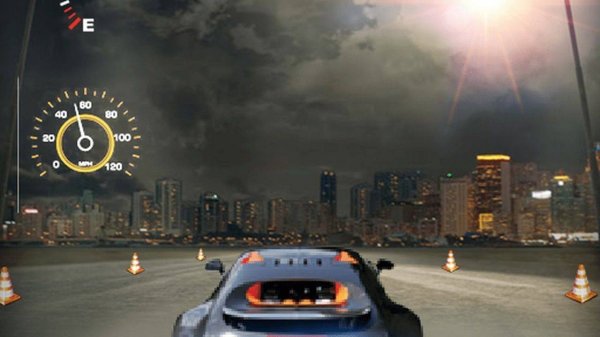
The game uses three-dimensional graphics to create a sense of depth and speed. Road markings, vehicle details, and background scenery change as players progress, giving each run a fresh visual feel. The camera angle stays focused on the action, making it easy to spot upcoming obstacles. Bright colors and clear contrast help distinguish between lanes and approaching cars, reducing eye strain during longer play sessions. The overall presentation aims for a clean, modern look that runs smoothly on a variety of devices.

Progression and Score System

Distance traveled serves as the primary measure of success in Speed Lane. Each successful navigation through traffic adds to the total distance, with the counter increasing steadily. Coins appear along the road and can be collected to boost the final score. Some coins are placed in slightly risky positions, encouraging players to weigh the benefit against the potential for a crash. The score resets after each collision, motivating repeated attempts to beat personal bests. There is no fixed endpoint, so improvement comes from consistent practice and better lane management.

Controls and Accessibility

The control scheme relies on simple touch gestures or keyboard inputs. Tapping or pressing left or right shifts the vehicle one lane at a time. There is no acceleration or braking mechanic, keeping the focus entirely on steering decisions. This simplicity makes the game approachable for younger players and those new to driving games. The response time is immediate, with no noticeable lag between input and on-screen movement. Players can start a new run instantly after a collision, minimizing downtime between attempts.

Strategic Thinking for Longer Runs

Success in Speed Lane depends on more than just fast reactions. Scanning several lanes ahead helps anticipate which paths will remain open. Smooth, deliberate lane changes reduce the risk of misjudging a gap. Collecting coins can provide small advantages, but prioritizing survival over collection often leads to longer distances. As traffic density increases, maintaining a calm mindset becomes important. Hesitation or panic moves frequently result in crashes, so staying composed under pressure is a skill that develops over time.

Family-Friendly Design Philosophy

The game avoids violent themes, complex narratives, or any content that might concern parents. The only goal is to drive safely through traffic, making it suitable for players of all ages. There are no timers, no lives, and no in-app purchases that affect gameplay. The experience is self-contained, with each run offering a complete challenge from start to finish. This design encourages short, satisfying play sessions that fit into busy schedules without requiring a long-term commitment.

Compatibility

๐Ÿ’ป Desktop | ๐Ÿ“ฑ Mobile | ๐Ÿ“Ÿ Tablet
โ€“ All supported ยท Best with Chrome or Safari

Frequently Asked Questions

Can I play Speed Lane: Endless Road Runner offline?
Yes, the game does not require an internet connection to play. All content is available locally on your device, making it ideal for travel or areas with limited connectivity. No data is streamed during gameplay.
Does Speed Lane support controller input?
The game is designed primarily for touch screens and keyboard controls. Some devices may support external controllers, but this is not guaranteed across all platforms. The built-in controls are optimized for quick, responsive steering.
Is there a leaderboard to compare scores with friends?
The game focuses on personal improvement rather than competitive rankings. Players can track their own best distances and attempt to beat them. Social features like leaderboards are not included in the current version.
How long does a typical game session last?
Session length varies based on skill level. Beginners might last 30 seconds to a minute, while experienced players can extend runs to several minutes. The endless format allows for both quick attempts and longer play sessions.
Are there different vehicles to unlock in Speed Lane?
The game features a single vehicle by default. There are no unlockable cars or customization options. The focus remains on the driving challenge itself rather than vehicle variety or progression systems.
Does the game include any advertisements?
Advertisements may appear between runs or during natural breaks in gameplay. They do not interrupt active driving sessions. The game remains free to play without requiring any purchases to remove ads.

Player Comments

0 comments
U
User
Loading comments...

Other Similar Games

8 games