 VortexPlay Arcade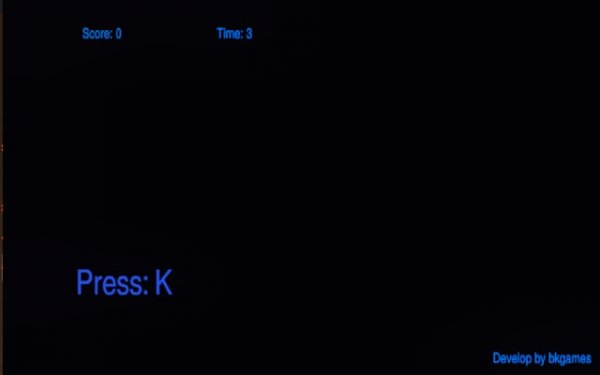
Core Gameplay Loop
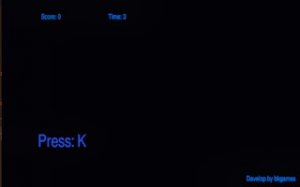
In Keyboard Reflex: Quick Type Trainer, the objective is straightforward: respond to random key prompts that appear on your screen by pressing the corresponding keys on your physical keyboard. Each successful press earns points, but pressing the wrong key or hesitating too long reduces the time on your countdown clock. This creates a focused environment where both speed and precision matter. The game begins after you press two specific keys simultaneously, which starts a 60-second timer. The action continues at a brisk pace until the timer expires, at which point your final score is displayed.
Skill Development Focus
This game is designed to help users build muscle memory for key positions and improve their overall typing fluency. By repeatedly responding to visual cues, players train their fingers to react without conscious thought. The pressure of a shrinking timer encourages faster decision-making, while the penalty for errors teaches the importance of accuracy. Over multiple sessions, players can track their progress and set personal goals to gradually increase their scores.
Visual and Audio Design
The interface is clean and minimal, with large, clearly visible key prompts that are easy to read at a glance. The color scheme uses high-contrast colors to ensure prompts stand out against the background. Subtle sound effects provide immediate feedback for correct and incorrect presses, helping players stay engaged without being distracting. The overall design prioritizes functionality, keeping the focus on the typing challenge itself.
Scoring and Motivation
The scoring system rewards both speed and accuracy. Each correct key press adds a set number of points, but the real challenge lies in maintaining a high rate of correct responses while avoiding time penalties. The final score serves as a benchmark for improvement, encouraging players to beat their own records. This self-competitive element motivates repeated play without relying on external rewards or complex progression systems.
Accessibility and Audience
Keyboard Reflex: Quick Type Trainer is suitable for a wide range of users, from students looking to improve their typing skills to professionals who want to increase their keyboard efficiency. The game requires no special equipment beyond a standard keyboard and a web browser. Its simple mechanics make it easy to pick up, while the increasing difficulty from faster prompts keeps it challenging for experienced typists.
Player Comments
0 comments