Menu
Stellar Clicker: Cosmic Orb Launcher
Idle Upgrades 5 Minute Quick Play

Stellar Clicker: Cosmic Orb Launcher

Stellar Clicker: Cosmic Orb Launcher nails the simple pleasure of watching numbers go up. The core loop of firing orbs and buying upgrades is immediately gratifying. What sets it apart is the gradual introduction of new launchers, each demanding a slightly different approach. The upgrade system offers meaningful choices without becoming overwhelming. Visually, the game is a treat with its vibrant colors and clean design. It respects your time with short sessions while still providing a compelling reason to return. A perfect pick for anyone who enjoys idle games with a touch of strategy.

🎮
Developer Fruit Reapers Creations
Rating
🎮 Game Player

About This Game

Core Loop: Launch, Earn, Upgrade

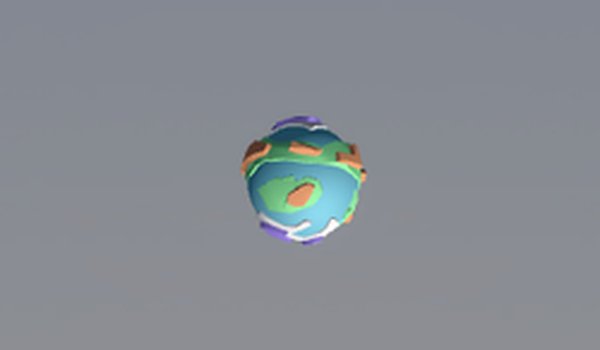
The heart of Stellar Clicker: Cosmic Orb Launcher revolves around a simple cycle. You aim and fire colorful orbs at a rotating planet. Each successful hit adds points to your total. Those points then let you purchase upgrades that improve your launcher's speed, power, or efficiency. This creates a satisfying loop where every session builds on the last, encouraging you to keep playing just a little longer.

Launcher Variety & Strategy

As you progress, new launchers become available. Each one changes how you interact with the planet. Some might fire faster, others might deliver a bigger point bonus, and some might have a unique trajectory. Experimenting with different launchers is key to finding a style that suits you. The game rewards trying out new tools rather than sticking with the first one you unlock.

Upgrade System: Planning Your Path

Upgrades are not just about raw power. You must decide whether to invest in speed for more frequent shots, power for bigger point gains, or efficiency to make each orb count. This adds a light strategic layer to what is otherwise a straightforward clicking game. Your choices affect how quickly you can earn points in future sessions, making each decision feel meaningful.

Visual Style & Atmosphere

The game uses bright, saturated colors and simple shapes to create a cheerful, low-stress environment. The planet reacts with small animations when hit, providing clear feedback. The overall look is clean and uncluttered, making it easy to focus on the action without distraction. This visual approach helps the game feel welcoming to players of all ages.

Session Length & Replay Value

Each play session is designed to last around five minutes, making it a great fit for quick breaks. However, the upgrade system and the desire to unlock the next launcher can easily draw you into longer sessions. High score tracking adds a reason to return, as you try to beat your personal best or challenge friends. The game respects your time while still offering depth for those who want it.

Compatibility

✅ Works on PC & Mobile | Recommended: Chrome / Safari / Edge

Frequently Asked Questions

How do I unlock new launchers in Stellar Clicker: Cosmic Orb Launcher?
New launchers become available as you accumulate enough points from your sessions. Each launcher requires a certain point threshold to unlock. Focus on earning points efficiently by upgrading your current launcher first, then save up for the next one. The game will notify you when a new launcher is ready to try.
Is there a way to reset my progress or start over?
The game does not have a built-in reset option, but you can clear your browser's local storage or cookies to remove saved data. This will erase all your points, upgrades, and unlocked launchers. Consider this only if you truly want to experience the early game again from scratch.
Can I play Stellar Clicker: Cosmic Orb Launcher on my phone or tablet?
The game is designed for desktop browsers with mouse input. It may not be optimized for touchscreens, so playing on a phone or tablet could be less precise. For the best experience, use a computer with a mouse to aim and fire your orbs accurately.
What happens when I max out all upgrades for a launcher?
Once a launcher's upgrades are fully maxed, you can still use it to earn points, but you will not gain any further improvements. At that point, your focus should shift to unlocking and upgrading other launchers to continue progressing and discovering new play styles.
Does the game have any sound or music?
The game includes simple sound effects for launching orbs and hitting the planet, providing audio feedback. There is no background music, which helps keep the experience focused and suitable for playing in quiet environments. You can adjust your device's volume to control the sound.
How is my high score saved between sessions?
Your high score is automatically saved in your browser's local storage. This means it persists even after you close the tab or restart your computer. However, clearing your browser data or using a different device will reset your saved score, so it is tied to the specific browser you use.

Player Comments

0 comments
U
User
Loading comments...

Other Similar Games

6 games